Fujitsu Wiring Guidelines
To make Fujitsu air conditioners smart, a Fujitsu protocol converter needs to be installed.
The system topology diagram is shown in the figure below:
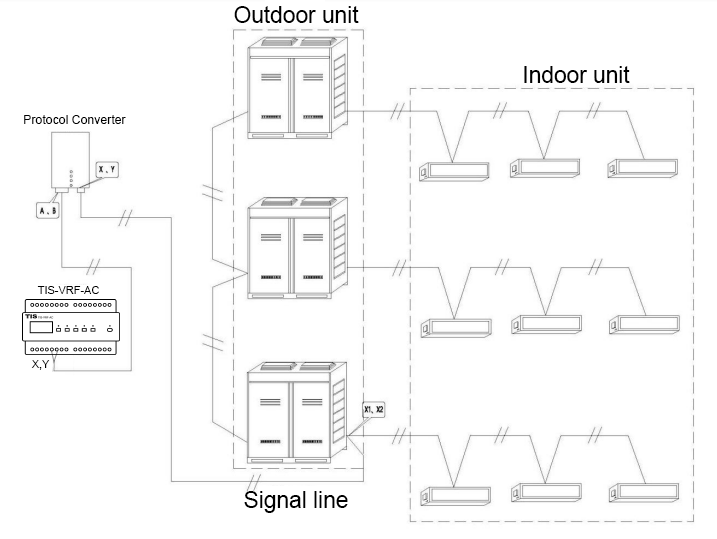
Connect the X and Y terminals of the Fujitsu protocol converter to the X1 and X2 terminals of the indoor or outdoor unit of the air conditioner. The A and B terminals of the Fujitsu protocol converter are connected to the X and Y terminals of the TIS-VRF-AC.

Let's talk about the debugging process of the Fujitsu protocol converter:
(1) Ensure that the internal and external units of the air conditioner are powered on and working normally, and the protocol converter and TIS-VRF-AC are powered on.
(2) The orange and green lights of the protocol converter flash alternately, wait for about one minute, the green light is always on, and the initialization of the protocol converter is completed.
(3) At this time, the DIP dial 4 of the Fujitsu protocol converter is set to ON, blue, red, orange, green, etc. flash at the same time, and the protocol converter starts to search for the air conditioner.
(4) Wait until the blue light is always on, and the other three lights are flashing (the number of lights and the frequency of flashing are different according to the number of air conditioners), and the protocol converter completes the process of searching for air conditioners.
(5) After the Fujitsu protocol converter completes the search for the air conditioner, dial 4 to return to the original state.
Note: When upgrading the firmware of TIS-VRF-AC, the air conditioner chooses Fujitsu-protocol converter