LG air conditioner wiring
The wiring of the LG air conditioner is shown in the figure below, and it can only be connected to the CEN.A CEN.B terminals of the external unit (no polarity, the air conditioner gateway will automatically reverse the polarity).
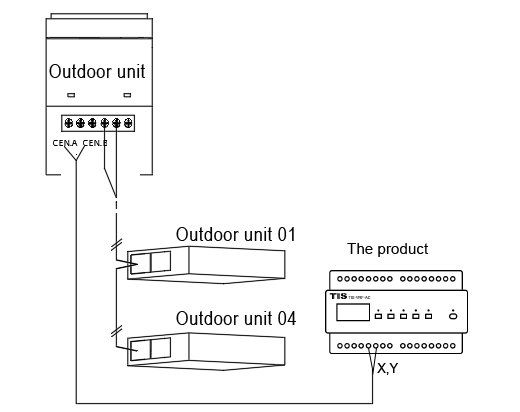
Note: LG air conditioners need to set the address of the air conditioner through the panel, please check the relevant documents.
Air conditioner address setting LG air conditioner
1. Set the address of the air conditioner through the wire controller (the method is as follows):
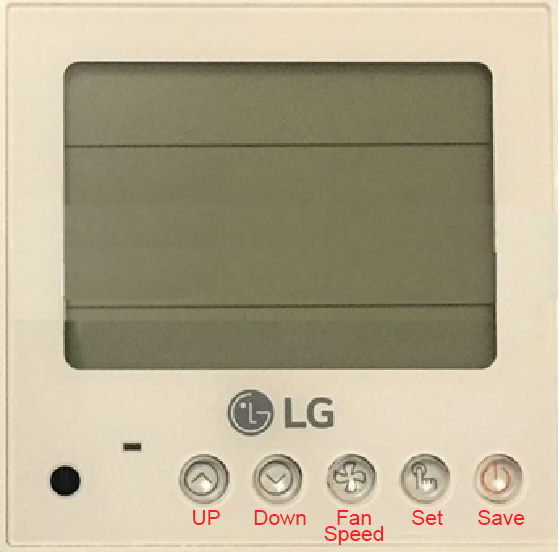
1. Press the "Up" and "Setting" keys at the same time for a few seconds to enter the mode selection.
2. Click the "Settings" button to enter the "02" centralized control mode.
3. Click the "down button" to select the set air conditioner address.
4. Press "Save" to save and confirm the selected address.
5. Press the "Up" and "Setting" keys at the same time for a few seconds to exit the normal working state.
2. The setting method of PQRCUC1W type wire controller is as follows:

1) Press the "Up" and "Operation Mode" keys at the same time for 5 or 6 seconds to enter the mode selection interface. (as pictured)
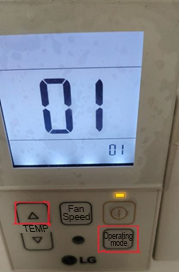
2) Press the "Operation Mode" button again to enter the "02" centralized control mode. (as pictured)
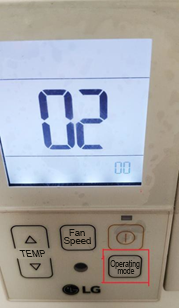
3) Press the "Up or Down" key to select the set air conditioner address (the up key will adjust the tens digit, and the down key will adjust the ones digit), and the address displayed in the lower right corner of the screen is the address of the air conditioner.
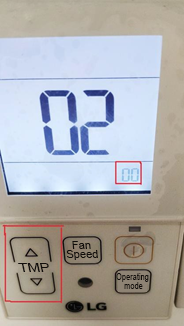
4) Press the "Save" button to save and confirm the selected address.
5) Press the "Up" and "Operation Mode" keys simultaneously for a few seconds to exit to the normal working state.